
Lesson guide
Learning objectives
- Explain the main purpose of URL objects in JavaScript.
- Identify the syntax, APIs, or concepts introduced in this lesson.
- Use the examples to predict how JavaScript will behave before you run similar code.
- Connect this topic to nearby lessons in Network requests.
Real-world context
This lesson matters when you need to recognize where URL objects fits into real JavaScript programs. The built-in class provides a convenient interface for creating and parsing URLs.
Key ideas
- URL objects is part of the Network requests chapter, so it builds on the surrounding concepts rather than standing alone.
- Read each code example in two passes: first for the result, then for the rule that explains the result.
- When a section compares similar features, focus on the condition that makes you choose one feature over another.
Key terms
- URL objects
- URL
- objects
- Network requests
- JavaScript
The built-in URL class provides a convenient interface for creating and parsing URLs.
There are no networking methods that require exactly a URL object, strings are good enough. So technically we don’t have to use URL. But sometimes it can be really helpful.
Creating a URL
The syntax to create a new URL object:
new URL(url, [base])
url– the full URL or only path (if base is set, see below),base– an optional base URL: if set andurlargument has only path, then the URL is generated relative tobase.
For example:
let url = new URL('https://www.learn-js.online/profile/admin');
These two URLs are same:
let url1 = new URL('https://www.learn-js.online/profile/admin');
let url2 = new URL('/profile/admin', 'https://www.learn-js.online');

alert(url1); // https://www.learn-js.online/profile/admin
alert(url2); // https://www.learn-js.online/profile/admin
We can easily create a new URL based on the path relative to an existing URL:
let url = new URL('https://www.learn-js.online/profile/admin');
let newUrl = new URL('tester', url);

alert(newUrl); // https://www.learn-js.online/profile/tester
The URL object immediately allows us to access its components, so it’s a nice way to parse the url, e.g.:
let url = new URL('https://www.learn-js.online/url');

alert(url.protocol); // https:
alert(url.host);     // javascript.info
alert(url.pathname); // /url
Here’s the cheatsheet for URL components:
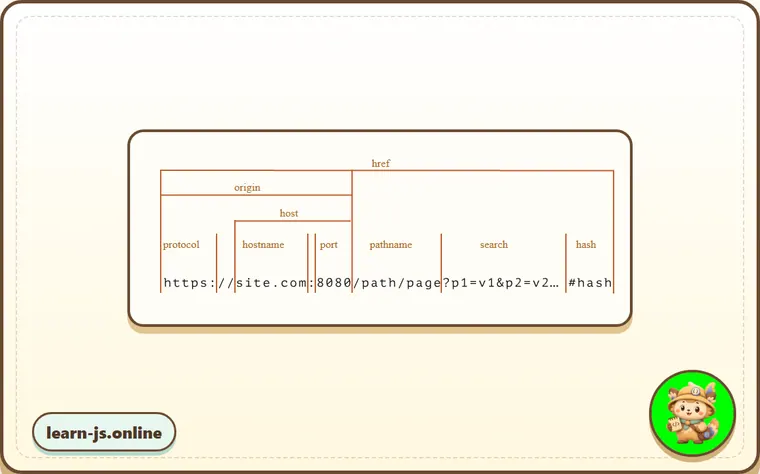
hrefis the full url, same asurl.toString()protocolends with the colon character:search– a string of parameters, starts with the question mark?hashstarts with the hash character#- there may be also
userandpasswordproperties if HTTP authentication is present:http://login:password@site.com(not painted above, rarely used).
We can pass URL objects to networking (and most other) methods instead of a string
We can use a URL object in fetch or XMLHttpRequest, almost everywhere where a URL-string is expected.
Generally, the URL object can be passed to any method instead of a string, as most methods will perform the string conversion, that turns a URL object into a string with full URL.
SearchParams “?…”
Let’s say we want to create a url with given search params, for instance, https://google.com/search?query=JavaScript.
We can provide them in the URL string:
new URL('https://google.com/search?query=JavaScript')
…But parameters need to be encoded if they contain spaces, non-latin letters, etc (more about that below).
So there’s a URL property for that: url.searchParams, an object of type URLSearchParams.
It provides convenient methods for search parameters:
append(name, value)– add the parameter byname,delete(name)– remove the parameter byname,get(name)– get the parameter byname,getAll(name)– get all parameters with the samename(that’s possible, e.g.?user=John&user=Pete),has(name)– check for the existence of the parameter byname,set(name, value)– set/replace the parameter,sort()– sort parameters by name, rarely needed,- …and it’s also iterable, similar to
Map.
An example with parameters that contain spaces and punctuation marks:
let url = new URL('https://google.com/search');

url.searchParams.set('q', 'test me!'); // added parameter with a space and !

alert(url); // https://google.com/search?q=test+me%21

url.searchParams.set('tbs', 'qdr:y'); // added parameter with a colon :

// parameters are automatically encoded
alert(url); // https://google.com/search?q=test+me%21&tbs=qdr%3Ay

// iterate over search parameters (decoded)
for(let [name, value] of url.searchParams) {
  alert(`${name}=${value}`); // q=test me!, then tbs=qdr:y
}
Encoding
There’s a standard RFC3986 that defines which characters are allowed in URLs and which are not.
Those that are not allowed, must be encoded, for instance non-latin letters and spaces – replaced with their UTF-8 codes, prefixed by %, such as %20 (a space can be encoded by +, for historical reasons, but that’s an exception).
The good news is that URL objects handle all that automatically. We just supply all parameters unencoded, and then convert the URL to string:
// using some cyrillic characters for this example

let url = new URL('https://ru.wikipedia.org/wiki/Тест');

url.searchParams.set('key', 'ъ');
alert(url); //https://ru.wikipedia.org/wiki/%D0%A2%D0%B5%D1%81%D1%82?key=%D1%8A
As you can see, both Тест in the url path and ъ in the parameter are encoded.
The URL became longer, because each cyrillic letter is represented with two bytes in UTF-8, so there are two %.. entities.
Encoding strings
In old times, before URL objects appeared, people used strings for URLs.
As of now, URL objects are often more convenient, but strings can still be used as well. In many cases using a string makes the code shorter.
If we use a string though, we need to encode/decode special characters manually.
There are built-in functions for that:
- encodeURI – encodes URL as a whole.
- decodeURI – decodes it back.
- encodeURIComponent – encodes a URL component, such as a search parameter, or a hash, or a pathname.
- decodeURIComponent – decodes it back.
A natural question is: “What’s the difference between encodeURIComponent and encodeURI? When we should use either?”
That’s easy to understand if we look at the URL, that’s split into components in the picture above:
https://site.com:8080/path/page?p1=v1&p2=v2#hash
As we can see, characters such as :, ?, =, &, # are allowed in URL.
…On the other hand, if we look at a single URL component, such as a search parameter, these characters must be encoded, not to break the formatting.
encodeURIencodes only characters that are totally forbidden in URL.encodeURIComponentencodes same characters, and, in addition to them, characters#,$,&,+,,,/,:,;,=,?and@.
So, for a whole URL we can use encodeURI:
// using cyrillic characters in url path
let url = encodeURI('http://site.com/привет');

alert(url); // http://site.com/%D0%BF%D1%80%D0%B8%D0%B2%D0%B5%D1%82
…While for URL parameters we should use encodeURIComponent instead:
let music = encodeURIComponent('Rock&Roll');

let url = `https://google.com/search?q=${music}`;
alert(url); // https://google.com/search?q=Rock%26Roll
Compare it with encodeURI:
let music = encodeURI('Rock&Roll');

let url = `https://google.com/search?q=${music}`;
alert(url); // https://google.com/search?q=Rock&Roll
As we can see, encodeURI does not encode &, as this is a legit character in URL as a whole.
But we should encode & inside a search parameter, otherwise, we get q=Rock&Roll – that is actually q=Rock plus some obscure parameter Roll. Not as intended.
So we should use only encodeURIComponent for each search parameter, to correctly insert it in the URL string. The safest is to encode both name and value, unless we’re absolutely sure that it has only allowed characters.
Encoding difference compared to URL
Classes URL and URLSearchParams are based on the latest URI specification: RFC3986, while encode* functions are based on the obsolete version RFC2396.
There are a few differences, e.g. IPv6 addresses are encoded differently:
// valid url with IPv6 address
let url = 'http://[2607:f8b0:4005:802::1007]/';

alert(encodeURI(url)); // http://%5B2607:f8b0:4005:802::1007%5D/
alert(new URL(url)); // http://[2607:f8b0:4005:802::1007]/
As we can see, encodeURI replaced square brackets [...], that’s not correct, the reason is: IPv6 urls did not exist at the time of RFC2396 (August 1998).
Such cases are rare, encode* functions work well most of the time.
Common mistakes
- Skipping the small examples and then missing the exact rule that URL objects depends on.
- Copying code without changing one value at a time to see which part controls the result.
- Treating similar-looking syntax or APIs as interchangeable before checking their edge cases.
Summary
- URL objects gives you one more piece of the JavaScript mental model.
- The examples in this lesson are the quickest way to check whether the rule is clear.
- Revisit the key terms when you meet the same idea in later chapters.
Predict
Before running this URL check, predict the six output lines. It models relative URL resolution, component parsing, URLSearchParams, repeated parameters, automatic encoding, and the difference between encodeURI and encodeURIComponent.
Reveal explanation
The output is href:https://learn-js.online/profile/tester?tab=stats#top, parts:https::learn-js.online:/profile/tester:#top, query:?tab=stats&q=Rock%26Roll&user=John&user=Pete, users:John|Pete, encodeURI:https://site.com/search?q=Rock&Roll, and component:Rock%26Roll. new URL(path, base) resolves relative paths against a base URL. URL properties expose protocol, host, pathname, search, and hash. URLSearchParams encodes special characters automatically and supports repeated names with append() and getAll(). encodeURI() is for a whole URL and keeps URL syntax characters like &, while encodeURIComponent() is for one component and encodes & so it cannot split a query parameter.
Try it
Replace append("user", "Pete") with set("user", "Pete"), then predict the users: line.
Practice
- Rewrite one example from this lesson without looking at the original, then run it and compare the result.
- Change one input, operator, method call, or option in a code sample and predict what will happen before running it.
- Explain URL objects in your own words as if you were reviewing it with another learner.
Keep learning
Continue with XMLHttpRequest when you are ready for the next lesson.