
Lesson guide
Learning objectives
- Explain the main purpose of F.prototype in JavaScript.
- Identify the syntax, APIs, or concepts introduced in this lesson.
- Use the examples to predict how JavaScript will behave before you run similar code.
- Connect this topic to nearby lessons in Prototypes, inheritance.
Real-world context
This lesson matters when you need to recognize where F.prototype fits into real JavaScript programs. Remember, new objects can be created with a constructor function, like .
Key ideas
- F.prototype is part of the Prototypes, inheritance chapter, so it builds on the surrounding concepts rather than standing alone.
- Read each code example in two passes: first for the result, then for the rule that explains the result.
- When a section compares similar features, focus on the condition that makes you choose one feature over another.
Key terms
- F.prototype
- prototype
- Prototypes, inheritance
- JavaScript
Remember, new objects can be created with a constructor function, like new F().
If F.prototype is an object, then the new operator uses it to set [[Prototype]] for the new object.
Please note:
JavaScript had prototypal inheritance from the beginning. It was one of the core features of the language.
But in the old times, there was no direct access to it. The only thing that worked reliably was a "prototype" property of the constructor function, described in this chapter. So there are many scripts that still use it.
Please note that F.prototype here means a regular property named "prototype" on F. It sounds something similar to the term “prototype”, but here we really mean a regular property with this name.
Here’s the example:
let animal = {
  eats: true
};

function Rabbit(name) {
  this.name = name;
}

Rabbit.prototype = animal;

let rabbit = new Rabbit("White Rabbit"); //  rabbit.__proto__ == animal

alert( rabbit.eats );
Setting Rabbit.prototype = animal literally states the following: “When a new Rabbit is created, assign its [[Prototype]] to animal”.
That’s the resulting picture:
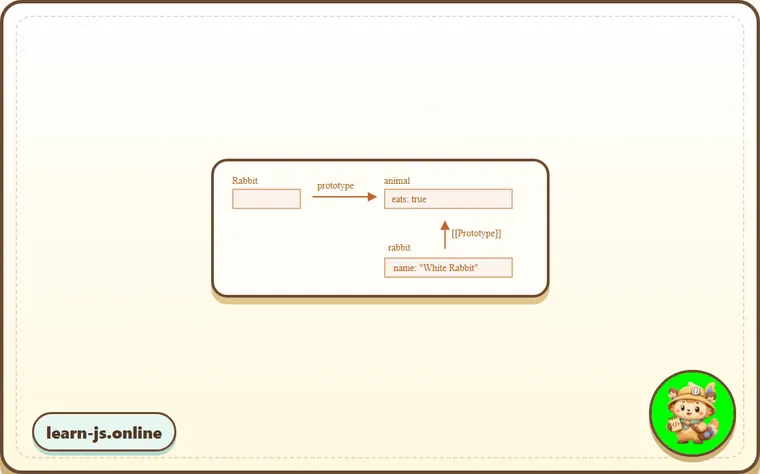
On the picture, "prototype" is a horizontal arrow, meaning a regular property, and [[Prototype]] is vertical, meaning the inheritance of rabbit from animal.
F.prototype only used at new F time
F.prototype property is only used when new F is called, it assigns [[Prototype]] of the new object.
If, after the creation, F.prototype property changes (F.prototype = <another object>), then new objects created by new F will have another object as [[Prototype]], but already existing objects keep the old one.
Default F.prototype, constructor property
Every function has the "prototype" property even if we don’t supply it.
The default "prototype" is an object with the only property constructor that points back to the function itself.
Like this:
function Rabbit() {}

/* default prototype
Rabbit.prototype = { constructor: Rabbit };
*/
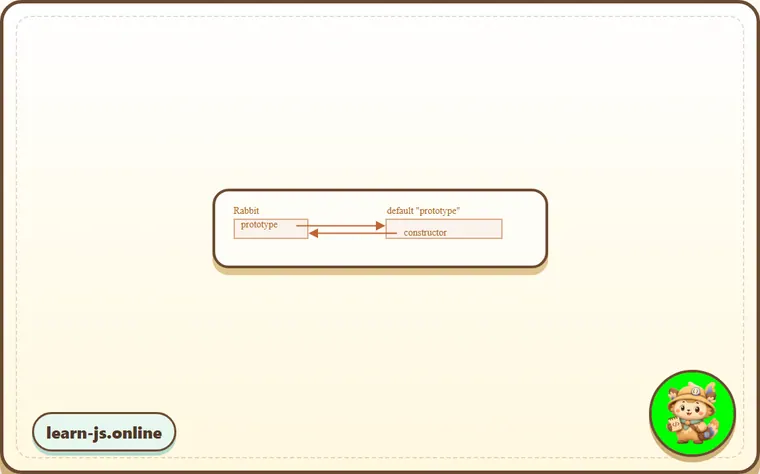
We can check it:
function Rabbit() {}
// by default:
// Rabbit.prototype = { constructor: Rabbit }

alert( Rabbit.prototype.constructor == Rabbit ); // true
Naturally, if we do nothing, the constructor property is available to all rabbits through [[Prototype]]:
function Rabbit() {}
// by default:
// Rabbit.prototype = { constructor: Rabbit }

let rabbit = new Rabbit(); // inherits from {constructor: Rabbit}

alert(rabbit.constructor == Rabbit); // true (from prototype)
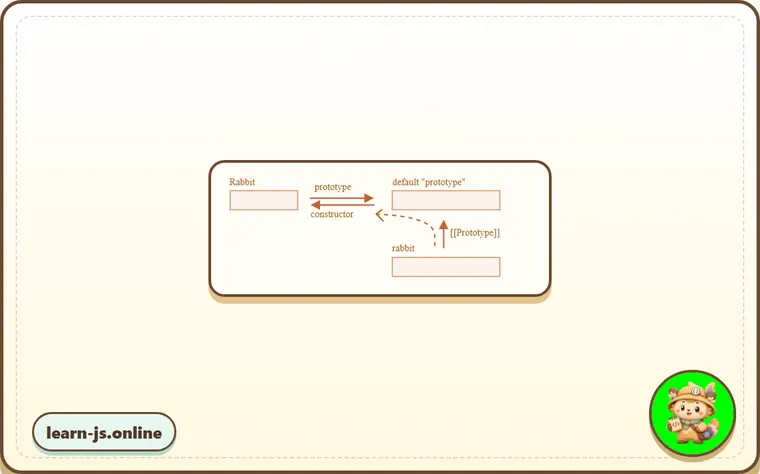
We can use constructor property to create a new object using the same constructor as the existing one.
Like here:
function Rabbit(name) {
  this.name = name;
  alert(name);
}

let rabbit = new Rabbit("White Rabbit");

let rabbit2 = new rabbit.constructor("Black Rabbit");
That’s handy when we have an object, don’t know which constructor was used for it (e.g. it comes from a 3rd party library), and we need to create another one of the same kind.
But probably the most important thing about "constructor" is that…
…JavaScript itself does not ensure the right "constructor" value.
Yes, it exists in the default "prototype" for functions, but that’s all. What happens with it later – is totally on us.
In particular, if we replace the default prototype as a whole, then there will be no "constructor" in it.
For instance:
function Rabbit() {}
Rabbit.prototype = {
  jumps: true
};

let rabbit = new Rabbit();
alert(rabbit.constructor === Rabbit); // false
So, to keep the right "constructor" we can choose to add/remove properties to the default "prototype" instead of overwriting it as a whole:
function Rabbit() {}

// Not overwrite Rabbit.prototype totally
// just add to it
Rabbit.prototype.jumps = true
// the default Rabbit.prototype.constructor is preserved
Or, alternatively, recreate the constructor property manually:
Rabbit.prototype = {
  jumps: true,
  constructor: Rabbit
};

// now constructor is also correct, because we added it
Common mistakes
- Skipping the small examples and then missing the exact rule that F.prototype depends on.
- Copying code without changing one value at a time to see which part controls the result.
- Treating similar-looking syntax or APIs as interchangeable before checking their edge cases.
Summary
In this chapter we briefly described the way of setting a [[Prototype]] for objects created via a constructor function. Later we’ll see more advanced programming patterns that rely on it.
Everything is quite simple, just a few notes to make things clear:
- The
F.prototypeproperty (don’t mistake it for[[Prototype]]) sets[[Prototype]]of new objects whennew F()is called. - The value of
F.prototypeshould be either an object ornull: other values won’t work. - The
"prototype"property only has such a special effect when set on a constructor function, and invoked withnew.
On regular objects the prototype is nothing special:
let user = {
  name: "John",
  prototype: "Bla-bla" // no magic at all
};
By default all functions have F.prototype = { constructor: F }, so we can get the constructor of an object by accessing its "constructor" property.
Predict
Before running this F.prototype check, predict the six output lines. It shows that F.prototype affects objects only when new F() runs, and that replacing it can break constructor.
Reveal explanation
The output is true, undefined, undefined, true, true, and false. Rabbit.prototype is used only at new Rabbit(...) time. white keeps the old prototype animal, so it has eats but not runs; black gets the later prototype runner, so it has runs but not eats. A function’s default prototype object has a constructor property pointing back to the function. Replacing Mouse.prototype with a new object removes that default constructor, so mouse.constructor === Mouse is false.
Try it
Instead of replacing Mouse.prototype, assign Mouse.prototype.squeaks = true; then predict the final line and explain why the default constructor is preserved.
Practice
- Rewrite one example from this lesson without looking at the original, then run it and compare the result.
- Change one input, operator, method call, or option in a code sample and predict what will happen before running it.
- Explain F.prototype in your own words as if you were reviewing it with another learner.
Keep learning
Continue with Native prototypes when you are ready for the next lesson.