
Lesson guide
Learning objectives
- Explain the main purpose of Character classes in JavaScript.
- Identify the syntax, APIs, or concepts introduced in this lesson.
- Use the examples to predict how JavaScript will behave before you run similar code.
- Connect this topic to nearby lessons in Regular expressions.
Real-world context
This lesson matters when you need to recognize where Character classes fits into real JavaScript programs. Consider a practical task – we have a phone number like , and we need to turn it into pure numbers: .
Key ideas
- Character classes is part of the Regular expressions chapter, so it builds on the surrounding concepts rather than standing alone.
- Read each code example in two passes: first for the result, then for the rule that explains the result.
- When a section compares similar features, focus on the condition that makes you choose one feature over another.
Key terms
- Character classes
- Character
- classes
- Regular expressions
- JavaScript
Consider a practical task – we have a phone number like "+7(903)-123-45-67", and we need to turn it into pure numbers: 79031234567.
To do so, we can find and remove anything that’s not a number. Character classes can help with that.
A character class is a special notation that matches any symbol from a certain set.
For the start, let’s explore the “digit” class. It’s written as \d and corresponds to “any single digit”.
For instance, let’s find the first digit in the phone number:
let str = "+7(903)-123-45-67";

let regexp = /\d/;

alert( str.match(regexp) );
Without the flag g, the regular expression only looks for the first match, that is the first digit \d.
Let’s add the g flag to find all digits:
let str = "+7(903)-123-45-67";

let regexp = /\d/g;

alert( str.match(regexp) ); // array of matches: 7,9,0,3,1,2,3,4,5,6,7

// let's make the digits-only phone number of them:
alert( str.match(regexp).join('') ); // 79031234567
That was a character class for digits. There are other character classes as well.
Most used are:
\d (“d” is from “digit”)A digit: a character from 0 to 9.\s (“s” is from “space”)A space symbol: includes spaces, tabs \t, newlines \n and few other rare characters, such as \v, \f and \r.\w (“w” is from “word”)A “wordly” character: either a letter of Latin alphabet or a digit or an underscore _. Non-Latin letters (like cyrillic or hindi) do not belong to \w.
For instance, \d\s\w means a “digit” followed by a “space character” followed by a “wordly character”, such as 1 a.
A regexp may contain both regular symbols and character classes.
For instance, CSS\d matches a string CSS with a digit after it:
let str = "Is there CSS4?";
let regexp = /CSS\d/

alert( str.match(regexp) ); // CSS4
Also we can use many character classes:
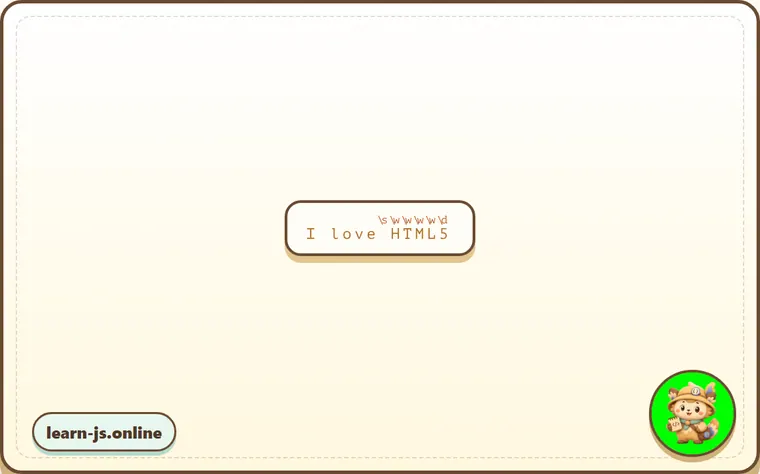
alert( "I love HTML5!".match(/\s\w\w\w\w\d/) ); // ' HTML5'
The match (each regexp character class has the corresponding result character):
Inverse classes
For every character class there exists an “inverse class”, denoted with the same letter, but uppercased.
The “inverse” means that it matches all other characters, for instance:
\DNon-digit: any character except \d, for instance a letter.\SNon-space: any character except \s, for instance a letter.\WNon-wordly character: anything but \w, e.g a non-latin letter or a space.
In the beginning of the chapter we saw how to make a number-only phone number from a string like +7(903)-123-45-67: find all digits and join them.
let str = "+7(903)-123-45-67";

alert( str.match(/\d/g).join('') ); // 79031234567
An alternative, shorter way is to find non-digits \D and remove them from the string:
let str = "+7(903)-123-45-67";

alert( str.replace(/\D/g, "") ); // 79031234567
A dot is “any character”
A dot . is a special character class that matches “any character except a newline”.
For instance:
alert( "Z".match(/./) ); // Z
Or in the middle of a regexp:
let regexp = /CS.4/;

alert( "CSS4".match(regexp) ); // CSS4
alert( "CS-4".match(regexp) ); // CS-4
alert( "CS 4".match(regexp) ); // CS 4 (space is also a character)
Please note that a dot means “any character”, but not the “absence of a character”. There must be a character to match it:
alert( "CS4".match(/CS.4/) ); // null, no match because there's no character for the dot
Dot as literally any character with “s” flag
By default, a dot doesn’t match the newline character \n.
For instance, the regexp A.B matches A, and then B with any character between them, except a newline \n:
alert( "A\nB".match(/A.B/) ); // null (no match)
There are many situations when we’d like a dot to mean literally “any character”, newline included.
That’s what flag s does. If a regexp has it, then a dot . matches literally any character:
alert( "A\nB".match(/A.B/s) ); // A\nB (match!)
Not supported in IE
The s flag is not supported in IE.
Luckily, there’s an alternative, that works everywhere. We can use a regexp like [\s\S] to match “any character” (this pattern will be covered in the article Sets and ranges [...]).
alert( "A\nB".match(/A[\s\S]B/) ); // A\nB (match!)
The pattern [\s\S] literally says: “a space character OR not a space character”. In other words, “anything”. We could use another pair of complementary classes, such as [\d\D], that doesn’t matter. Or even the [^] – as it means match any character except nothing.
Also we can use this trick if we want both kind of “dots” in the same pattern: the actual dot . behaving the regular way (“not including a newline”), and also a way to match “any character” with [\s\S] or alike.
Pay attention to spaces
Usually we pay little attention to spaces. For us strings 1-5 and 1 - 5 are nearly identical.
But if a regexp doesn’t take spaces into account, it may fail to work.
Let’s try to find digits separated by a hyphen:
alert( "1 - 5".match(/\d-\d/) ); // null, no match!
Let’s fix it adding spaces into the regexp \d - \d:
alert( "1 - 5".match(/\d - \d/) ); // 1 - 5, now it works
// or we can use \s class:
alert( "1 - 5".match(/\d\s-\s\d/) ); // 1 - 5, also works
A space is a character. Equal in importance with any other character.
We can’t add or remove spaces from a regular expression and expect it to work the same.
In other words, in a regular expression all characters matter, spaces too.
Common mistakes
- Skipping the small examples and then missing the exact rule that Character classes depends on.
- Copying code without changing one value at a time to see which part controls the result.
- Treating similar-looking syntax or APIs as interchangeable before checking their edge cases.
Summary
There exist following character classes:
\d– digits.\D– non-digits.\s– space symbols, tabs, newlines.\S– all but\s.\w– Latin letters, digits, underscore'_'.\W– all but\w..– any character if with the regexp's'flag, otherwise any except a newline\n.
…But that’s not all!
Unicode encoding, used by JavaScript for strings, provides many properties for characters, like: which language the letter belongs to (if it’s a letter), is it a punctuation sign, etc.
We can search by these properties as well. That requires flag u, covered in the next article.
Predict
Before running this character-classes block, predict the six output lines. It covers \d, \D, \s, \w, dot without newline, dot with the s flag, and the fact that literal spaces in a regexp matter.
Reveal explanation
\d finds digits, while \D lets us remove everything that is not a digit. \w matches Latin letters, digits, and underscore, so it can match HTML5. A dot does not match \n unless the regexp has flag s. The final check also shows that spaces are real pattern characters: \d - \d matches 1 - 5, while \d-\d would not.
Try it
Replace /A.B/s with /A[\s\S]B/, then predict whether the dotall line changes. Then change "1 - 5" to "1-5" and decide which space-aware pattern would fail.
Practice
- Rewrite one example from this lesson without looking at the original, then run it and compare the result.
- Change one input, operator, method call, or option in a code sample and predict what will happen before running it.
- Explain Character classes in your own words as if you were reviewing it with another learner.
Keep learning
Continue with Unicode: flag "u" and class \p{...} when you are ready for the next lesson.