
Lesson guide
Learning objectives
- Explain the main purpose of Word boundary: \b in JavaScript.
- Identify the syntax, APIs, or concepts introduced in this lesson.
- Use the examples to predict how JavaScript will behave before you run similar code.
- Connect this topic to nearby lessons in Regular expressions.
Real-world context
This lesson matters when you need to recognize where Word boundary: \b fits into real JavaScript programs. A word boundary is a test, just like and .
Key ideas
- Word boundary: \b is part of the Regular expressions chapter, so it builds on the surrounding concepts rather than standing alone.
- Read each code example in two passes: first for the result, then for the rule that explains the result.
- When a section compares similar features, focus on the condition that makes you choose one feature over another.
Key terms
- Word boundary: \b
- Word
- boundary
- Regular expressions
- JavaScript
A word boundary \b is a test, just like ^ and $.
When the regexp engine (program module that implements searching for regexps) comes across \b, it checks that the position in the string is a word boundary.
There are three different positions that qualify as word boundaries:
- At string start, if the first string character is a word character
\w. - Between two characters in the string, where one is a word character
\wand the other is not. - At string end, if the last string character is a word character
\w.
For instance, regexp \bJava\b will be found in Hello, Java!, where Java is a standalone word, but not in Hello, JavaScript!.
alert( "Hello, Java!".match(/\bJava\b/) ); // Java
alert( "Hello, JavaScript!".match(/\bJava\b/) );
In the string Hello, Java! following positions correspond to \b:
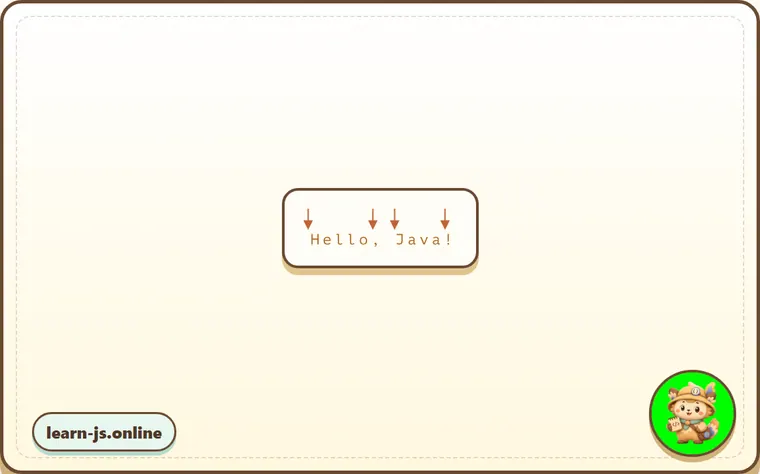
So, it matches the pattern \bHello\b, because:
- At the beginning of the string matches the first test
\b. - Then matches the word
Hello. - Then the test
\bmatches again, as we’re betweenoand a comma.
So the pattern \bHello\b would match, but not \bHell\b (because there’s no word boundary after l) and not Java!\b (because the exclamation sign is not a wordly character \w, so there’s no word boundary after it).
alert( "Hello, Java!".match(/\bHello\b/) ); // Hello
alert( "Hello, Java!".match(/\bJava\b/) );  // Java
alert( "Hello, Java!".match(/\bHell\b/) );  // null (no match)
alert( "Hello, Java!".match(/\bJava!\b/) ); // null (no match)
We can use \b not only with words, but with digits as well.
For example, the pattern \b\d\d\b looks for standalone 2-digit numbers. In other words, it looks for 2-digit numbers that are surrounded by characters different from \w, such as spaces or punctuation (or text start/end).
alert( "1 23 456 78".match(/\b\d\d\b/g) ); // 23,78
alert( "12,34,56".match(/\b\d\d\b/g) ); // 12,34,56
Word boundary \b doesn’t work for non-latin alphabets
The word boundary test \b checks that there should be \w on the one side from the position and “not \w” – on the other side.
But \w means a latin letter a-z (or a digit or an underscore), so the test doesn’t work for other characters, e.g. cyrillic letters or hieroglyphs.
Common mistakes
- Skipping the small examples and then missing the exact rule that Word boundary: \b depends on.
- Copying code without changing one value at a time to see which part controls the result.
- Treating similar-looking syntax or APIs as interchangeable before checking their edge cases.
Summary
- Word boundary: \b gives you one more piece of the JavaScript mental model.
- The examples in this lesson are the quickest way to check whether the rule is clear.
- Revisit the key terms when you meet the same idea in later chapters.
Predict
Before running this word-boundary block, predict the six output lines. It treats \b as a zero-width test between \w and non-\w, then checks standalone words, standalone two-digit numbers, punctuation, and non-Latin text.
Reveal explanation
\bJava\b matches Java as a standalone word but not the Java part inside JavaScript. Digits are \w, so \b\d\d\b finds two-digit groups separated by spaces or punctuation. JavaScript \b is tied to \w, and \w is Latin letters, digits, and underscore, so it is not a good boundary test for Cyrillic words. Like anchors, \b has zero width.
Try it
Change "Hello, JavaScript!" to "Hello, Java-Script!", then predict javascript. Then replace \b\d\d\b with \d\d and predict which longer number contributes a match.
Practice
- Rewrite one example from this lesson without looking at the original, then run it and compare the result.
- Change one input, operator, method call, or option in a code sample and predict what will happen before running it.
- Explain Word boundary: \b in your own words as if you were reviewing it with another learner.
Keep learning
Continue with Escaping, special characters when you are ready for the next lesson.