
Lesson guide
Learning objectives
- Explain the main purpose of Extending built-in classes in JavaScript.
- Identify the syntax, APIs, or concepts introduced in this lesson.
- Use the examples to predict how JavaScript will behave before you run similar code.
- Connect this topic to nearby lessons in Classes.
Real-world context
This lesson matters when you need to recognize where Extending built-in classes fits into real JavaScript programs. Built-in classes like Array, Map and others are extendable also.
Key ideas
- Extending built-in classes is part of the Classes chapter, so it builds on the surrounding concepts rather than standing alone.
- Read each code example in two passes: first for the result, then for the rule that explains the result.
- When a section compares similar features, focus on the condition that makes you choose one feature over another.
Key terms
- Extending built-in classes
- Extending
- built-in
- classes
- Classes
Built-in classes like Array, Map and others are extendable also.
For instance, here PowerArray inherits from the native Array:
// add one more method to it (can do more)
class PowerArray extends Array {
  isEmpty() {
    return this.length === 0;
  }
}

let arr = new PowerArray(1, 2, 5, 10, 50);
alert(arr.isEmpty());

let filteredArr = arr.filter(item => item >= 10);
alert(filteredArr); // 10, 50
alert(filteredArr.isEmpty());
Please note a very interesting thing. Built-in methods like filter, map and others – return new objects of exactly the inherited type PowerArray. Their internal implementation uses the object’s constructor property for that.
In the example above,
arr.constructor === PowerArray
When arr.filter() is called, it internally creates the new array of results using exactly arr.constructor, not basic Array. That’s actually very cool, because we can keep using PowerArray methods further on the result.
Even more, we can customize that behavior.
We can add a special static getter Symbol.species to the class. If it exists, it should return the constructor that JavaScript will use internally to create new entities in map, filter and so on.
If we’d like built-in methods like map or filter to return regular arrays, we can return Array in Symbol.species, like here:
class PowerArray extends Array {
  isEmpty() {
    return this.length === 0;
  }

  // built-in methods will use this as the constructor
  static get [Symbol.species]() {
    return Array;
  }
}

let arr = new PowerArray(1, 2, 5, 10, 50);
alert(arr.isEmpty()); // false

// filter creates new array using arr.constructor[Symbol.species] as constructor
let filteredArr = arr.filter(item => item >= 10);

// filteredArr is not PowerArray, but Array
alert(filteredArr.isEmpty()); // Error: filteredArr.isEmpty is not a function
As you can see, now .filter returns Array. So the extended functionality is not passed any further.
Other collections work similarly
Other collections, such as Map and Set, work alike. They also use Symbol.species.
No static inheritance in built-ins
Built-in objects have their own static methods, for instance Object.keys, Array.isArray etc.
As we already know, native classes extend each other. For instance, Array extends Object.
Normally, when one class extends another, both static and non-static methods are inherited. That was thoroughly explained in the article Static properties and methods.
But built-in classes are an exception. They don’t inherit statics from each other.
For example, both Array and Date inherit from Object, so their instances have methods from Object.prototype. But Array.[[Prototype]] does not reference Object, so there’s no, for instance, Array.keys() (or Date.keys()) static method.
Here’s the picture structure for Date and Object:
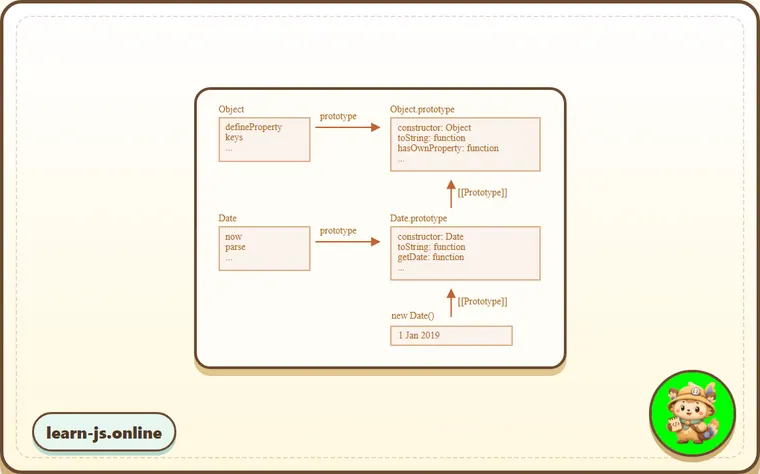
As you can see, there’s no link between Date and Object. They are independent, only Date.prototype inherits from Object.prototype.
That’s an important difference of inheritance between built-in objects compared to what we get with extends.
Common mistakes
- Skipping the small examples and then missing the exact rule that Extending built-in classes depends on.
- Copying code without changing one value at a time to see which part controls the result.
- Treating similar-looking syntax or APIs as interchangeable before checking their edge cases.
Summary
- Extending built-in classes gives you one more piece of the JavaScript mental model.
- The examples in this lesson are the quickest way to check whether the rule is clear.
- Revisit the key terms when you meet the same idea in later chapters.
Predict
Before running this built-in-extension check, predict the six output lines. It compares normal subclass results with a subclass that changes Symbol.species.
Reveal explanation
The output is false, true, false, false, true, and undefined. PowerArray extends Array, so it has normal array behavior plus isEmpty(). Built-in methods such as filter use the subclass constructor by default, so filteredPower is also a PowerArray. PlainResultArray overrides Symbol.species to return Array, so filter returns a regular array: it is still an array, but it is not a PlainResultArray and has no isEmpty method.
Try it
Remove the Symbol.species getter from PlainResultArray, then predict the final three output lines.
Practice
- Rewrite one example from this lesson without looking at the original, then run it and compare the result.
- Change one input, operator, method call, or option in a code sample and predict what will happen before running it.
- Explain Extending built-in classes in your own words as if you were reviewing it with another learner.
Keep learning
Continue with Class checking: "instanceof" when you are ready for the next lesson.