
Lesson guide
Learning objectives
- Explain the main purpose of Class basic syntax in JavaScript.
- Identify the syntax, APIs, or concepts introduced in this lesson.
- Use the examples to predict how JavaScript will behave before you run similar code.
- Connect this topic to nearby lessons in Classes.
Real-world context
This lesson matters when you need to recognize where Class basic syntax fits into real JavaScript programs. > In object-oriented programming, a class is an extensible program-code-template for creating objects, providing initial values for state (member variables) and implementations of behavior (member functions or methods).
Key ideas
- Class basic syntax is part of the Classes chapter, so it builds on the surrounding concepts rather than standing alone.
- Read each code example in two passes: first for the result, then for the rule that explains the result.
- When a section compares similar features, focus on the condition that makes you choose one feature over another.
Key terms
- Class basic syntax
- Class
- basic
- syntax
- Classes
In object-oriented programming, a class is an extensible program-code-template for creating objects, providing initial values for state (member variables) and implementations of behavior (member functions or methods).
In practice, we often need to create many objects of the same kind, like users, or goods or whatever.
As we already know from the chapter Constructor, operator "new", new function can help with that.
But in the modern JavaScript, there’s a more advanced “class” construct, that introduces great new features which are useful for object-oriented programming.
The “class” syntax
The basic syntax is:
class MyClass {
  // class methods
  constructor() { ... }
  method1() { ... }
  method2() { ... }
  method3() { ... }
  ...
}
Then use new MyClass() to create a new object with all the listed methods.
The constructor() method is called automatically by new, so we can initialize the object there.
For example:
class User {

  constructor(name) {
    this.name = name;
  }

  sayHi() {
    alert(this.name);
  }

}

// Usage:
let user = new User("John");
user.sayHi();
When new User("John") is called:
- A new object is created.
- The
constructorruns with the given argument and assigns it tothis.name.
…Then we can call object methods, such as user.sayHi().
No comma between class methods
A common pitfall for novice developers is to put a comma between class methods, which would result in a syntax error.
The notation here is not to be confused with object literals. Within the class, no commas are required.
What is a class?
So, what exactly is a class? That’s not an entirely new language-level entity, as one might think.
Let’s unveil any magic and see what a class really is. That’ll help in understanding many complex aspects.
In JavaScript, a class is a kind of function.
Here, take a look:
class User {
  constructor(name) { this.name = name; }
  sayHi() { alert(this.name); }
}

// proof: User is a function
alert(typeof User); // function
What class User {...} construct really does is:
- Creates a function named
User, that becomes the result of the class declaration. The function code is taken from theconstructormethod (assumed empty if we don’t write such method). - Stores class methods, such as
sayHi, inUser.prototype.
After new User object is created, when we call its method, it’s taken from the prototype, just as described in the chapter F.prototype. So the object has access to class methods.
We can illustrate the result of class User declaration as:
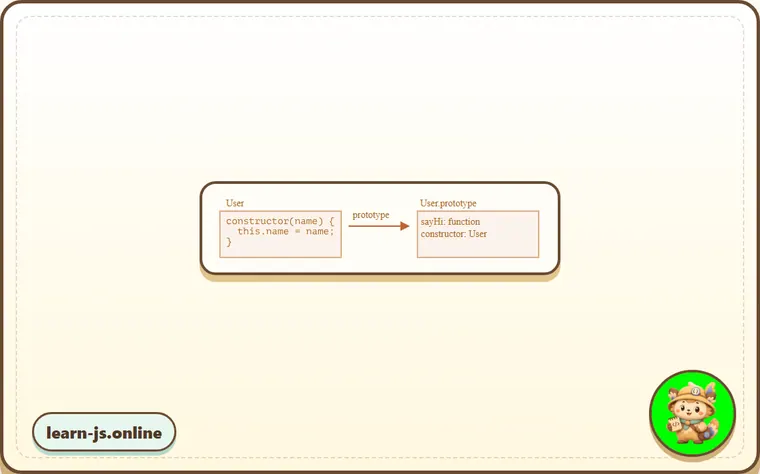
Here’s the code to introspect it:
class User {
  constructor(name) { this.name = name; }
  sayHi() { alert(this.name); }
}

// class is a function
alert(typeof User); // function

// ...or, more precisely, the constructor method
alert(User === User.prototype.constructor); // true

// The methods are in User.prototype, e.g:
alert(User.prototype.sayHi); // the code of the sayHi method

// there are exactly two methods in the prototype
alert(Object.getOwnPropertyNames(User.prototype)); // constructor, sayHi
Not just a syntactic sugar
Sometimes people say that class is a “syntactic sugar” (syntax that is designed to make things easier to read, but doesn’t introduce anything new), because we could actually declare the same thing without using the class keyword at all:
// rewriting class User in pure functions

// 1. Create constructor function
function User(name) {
  this.name = name;
}
// a function prototype has "constructor" property by default,
// so we don't need to create it

// 2. Add the method to prototype
User.prototype.sayHi = function() {
  alert(this.name);
};

// Usage:
let user = new User("John");
user.sayHi();
The result of this definition is about the same. So, there are indeed reasons why class can be considered a syntactic sugar to define a constructor together with its prototype methods.
Still, there are important differences.
- First, a function created by
classis labelled by a special internal property[[IsClassConstructor]]: true. So it’s not entirely the same as creating it manually.
The language checks for that property in a variety of places. For example, unlike a regular function, it must be called with new:
class User {
  constructor() {}
}

alert(typeof User); // function
User(); // Error: Class constructor User cannot be invoked without 'new'
Also, a string representation of a class constructor in most JavaScript engines starts with the “class…”
class User {
  constructor() {}
}

alert(User); // class User { ... }
There are other differences, we’ll see them soon.
- Class methods are non-enumerable.
A class definition sets
enumerableflag tofalsefor all methods in the"prototype".
That’s good, because if we for..in over an object, we usually don’t want its class methods.
- Classes always
use strict. All code inside the class construct is automatically in strict mode.
Besides, class syntax brings many other features that we’ll explore later.
Class Expression
Just like functions, classes can be defined inside another expression, passed around, returned, assigned, etc.
Here’s an example of a class expression:
let User = class {
  sayHi() {
    alert("Hello");
  }
};
Similar to Named Function Expressions, class expressions may have a name.
If a class expression has a name, it’s visible inside the class only:
// "Named Class Expression"
// (no such term in the spec, but that's similar to Named Function Expression)
let User = class MyClass {
  sayHi() {
    alert(MyClass); // MyClass name is visible only inside the class
  }
};

new User().sayHi(); // works, shows MyClass definition

alert(MyClass); // error, MyClass name isn't visible outside of the class
We can even make classes dynamically “on-demand”, like this:
function makeClass(phrase) {
  // declare a class and return it
  return class {
    sayHi() {
      alert(phrase);
    }
  };
}

// Create a new class
let User = makeClass("Hello");

new User().sayHi(); // Hello
Getters/setters
Just like literal objects, classes may include getters/setters, computed properties etc.
Here’s an example for user.name implemented using get/set:
class User {

  constructor(name) {
    // invokes the setter
    this.name = name;
  }

  get name() {
    return this._name;
  }

  set name(value) {
    if (value.length < 4) {
      alert("Name is too short.");
      return;
    }
    this._name = value;
  }

}

let user = new User("John");
alert(user.name); // John

user = new User(""); // Name is too short.
Technically, such class declaration works by creating getters and setters in User.prototype.
Computed names […]
Here’s an example with a computed method name using brackets [...]:
class User {

  ['say' + 'Hi']() {
    alert("Hello");
  }

}

new User().sayHi();
Such features are easy to remember, as they resemble that of literal objects.
Class fields
Old browsers may need a polyfill
Class fields are a recent addition to the language.
Previously, our classes only had methods.
“Class fields” is a syntax that allows to add any properties.
For instance, let’s add name property to class User:
class User {
  name = "John";

  sayHi() {
    alert(`Hello, ${this.name}!`);
  }
}

new User().sayHi(); // Hello, John!
So, we just write “ = ” in the declaration, and that’s it.
The important difference of class fields is that they are set on individual objects, not User.prototype:
class User {
  name = "John";
}

let user = new User();
alert(user.name); // John
alert(User.prototype.name); // undefined
We can also assign values using more complex expressions and function calls:
class User {
  name = prompt("Name, please?", "John");
}

let user = new User();
alert(user.name); // John
Making bound methods with class fields
As demonstrated in the chapter Function binding functions in JavaScript have a dynamic this. It depends on the context of the call.
So if an object method is passed around and called in another context, this won’t be a reference to its object any more.
For instance, this code will show undefined:
class Button {
  constructor(value) {
    this.value = value;
  }

  click() {
    alert(this.value);
  }
}

let button = new Button("hello");

setTimeout(button.click, 1000); // undefined
The problem is called “losing this”.
There are two approaches to fixing it, as discussed in the chapter Function binding:
- Pass a wrapper-function, such as
setTimeout(() => button.click(), 1000). - Bind the method to object, e.g. in the constructor.
Class fields provide another, quite elegant syntax:
class Button {
  constructor(value) {
    this.value = value;
  }
  click = () => {
    alert(this.value);
  }
}

let button = new Button("hello");

setTimeout(button.click, 1000); // hello
The class field click = () => {...} is created on a per-object basis, there’s a separate function for each Button object, with this inside it referencing that object. We can pass button.click around anywhere, and the value of this will always be correct.
That’s especially useful in browser environment, for event listeners.
Common mistakes
- Skipping the small examples and then missing the exact rule that Class basic syntax depends on.
- Copying code without changing one value at a time to see which part controls the result.
- Treating similar-looking syntax or APIs as interchangeable before checking their edge cases.
Summary
The basic class syntax looks like this:
class MyClass {
  prop = value; // property

  constructor(...) { // constructor
    // ...
  }

  method(...) {} // method

  get something(...) {} // getter method
  set something(...) {} // setter method

  [Symbol.iterator]() {} // method with computed name (symbol here)
  // ...
}
MyClass is technically a function (the one that we provide as constructor), while methods, getters and setters are written to MyClass.prototype.
In the next chapters we’ll learn more about classes, including inheritance and other features.
Predict
Before running this class check, predict the seven output lines. It covers constructor setup, getters/setters, computed method names, class fields, prototype methods, non-enumerability, and the new requirement.
Reveal explanation
The output is function, true, student:John, Bye John, role,_name, 0, and TypeError. A class is implemented as a special constructor function, and User.prototype.constructor points back to it. The class field role and the setter-created _name are own instance properties, so Object.keys(user) lists them. Methods, getters, and setters live on User.prototype, and class methods are non-enumerable, so Object.keys(User.prototype) is empty. A class constructor cannot be called without new, so User("Pete") throws TypeError.
Try it
Create new User("Al"), then predict how the setter changes the third and fourth output lines for that instance.
Practice
- Rewrite one example from this lesson without looking at the original, then run it and compare the result.
- Change one input, operator, method call, or option in a code sample and predict what will happen before running it.
- Explain Class basic syntax in your own words as if you were reviewing it with another learner.
Keep learning
Continue with Class inheritance when you are ready for the next lesson.