
Lesson guide
Learning objectives
- Explain the main purpose of Class checking: "instanceof" in JavaScript.
- Identify the syntax, APIs, or concepts introduced in this lesson.
- Use the examples to predict how JavaScript will behave before you run similar code.
- Connect this topic to nearby lessons in Classes.
Real-world context
This lesson matters when you need to recognize where Class checking: "instanceof" fits into real JavaScript programs. The operator allows to check whether an object belongs to a certain class.
Key ideas
- Class checking: "instanceof" is part of the Classes chapter, so it builds on the surrounding concepts rather than standing alone.
- Read each code example in two passes: first for the result, then for the rule that explains the result.
- When a section compares similar features, focus on the condition that makes you choose one feature over another.
Key terms
- Class checking: "instanceof"
- Class
- checking
- instanceof
- Classes
The instanceof operator allows to check whether an object belongs to a certain class. It also takes inheritance into account.
Such a check may be necessary in many cases. For example, it can be used for building a polymorphic function, the one that treats arguments differently depending on their type.
The instanceof operator
The syntax is:
obj instanceof Class
It returns true if obj belongs to the Class or a class inheriting from it.
For instance:
class Rabbit {}
let rabbit = new Rabbit();

// is it an object of Rabbit class?
alert( rabbit instanceof Rabbit );
It also works with constructor functions:
// instead of class
function Rabbit() {}

alert( new Rabbit() instanceof Rabbit ); // true
…And with built-in classes like Array:
let arr = [1, 2, 3];
alert( arr instanceof Array ); // true
alert( arr instanceof Object ); // true
Please note that arr also belongs to the Object class. That’s because Array prototypically inherits from Object.
Normally, instanceof examines the prototype chain for the check. We can also set a custom logic in the static method Symbol.hasInstance.
The algorithm of obj instanceof Class works roughly as follows:
- If there’s a static method
Symbol.hasInstance, then just call it:Class[Symbol.hasInstance](obj). It should return eithertrueorfalse, and we’re done. That’s how we can customize the behavior ofinstanceof.
For example:
// set up instanceof check that assumes that
// anything with canEat property is an animal
class Animal {
  static [Symbol.hasInstance](obj) {
    if (obj.canEat) return true;
  }
}

let obj = { canEat: true };

alert(obj instanceof Animal); // true: Animal[Symbol.hasInstance](obj) is called
- Most classes do not have
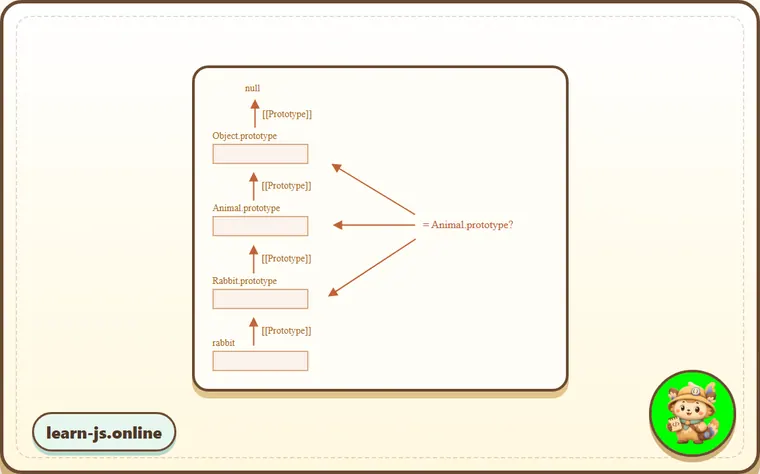
Symbol.hasInstance. In that case, the standard logic is used:obj instanceof Classchecks whetherClass.prototypeis equal to one of the prototypes in theobjprototype chain.
In other words, compare one after another:
obj.__proto__ === Class.prototype?
obj.__proto__.__proto__ === Class.prototype?
obj.__proto__.__proto__.__proto__ === Class.prototype?
...
// if any answer is true, return true
// otherwise, if we reached the end of the chain, return false
In the example above rabbit.__proto__ === Rabbit.prototype, so that gives the answer immediately.
In the case of an inheritance, the match will be at the second step:
class Animal {}
class Rabbit extends Animal {}

let rabbit = new Rabbit();
alert(rabbit instanceof Animal); // true

// rabbit.__proto__ === Animal.prototype (no match)
// rabbit.__proto__.__proto__ === Animal.prototype (match!)
Here’s the illustration of what rabbit instanceof Animal compares with Animal.prototype:
By the way, there’s also a method objA.isPrototypeOf(objB), that returns true if objA is somewhere in the chain of prototypes for objB. So the test of obj instanceof Class can be rephrased as Class.prototype.isPrototypeOf(obj).
It’s funny, but the Class constructor itself does not participate in the check! Only the chain of prototypes and Class.prototype matters.
That can lead to interesting consequences when a prototype property is changed after the object is created.
Like here:
function Rabbit() {}
let rabbit = new Rabbit();

// changed the prototype
Rabbit.prototype = {};

// ...not a rabbit any more!
alert( rabbit instanceof Rabbit ); // false
Bonus: Object.prototype.toString for the type
We already know that plain objects are converted to string as [object Object]:
let obj = {};

alert(obj); // [object Object]
alert(obj.toString()); // the same
That’s their implementation of toString. But there’s a hidden feature that makes toString actually much more powerful than that. We can use it as an extended typeof and an alternative for instanceof.
Sounds strange? Indeed. Let’s demystify.
By specification, the built-in toString can be extracted from the object and executed in the context of any other value. And its result depends on that value.
- For a number, it will be
[object Number] - For a boolean, it will be
[object Boolean] - For
null:[object Null] - For
undefined:[object Undefined] - For arrays:
[object Array] - …etc (customizable).
Let’s demonstrate:
// copy toString method into a variable for convenience
let objectToString = Object.prototype.toString;

// what type is this?
let arr = [];

alert( objectToString.call(arr) ); // [object Array]
Here we used call as described in the chapter Decorators and forwarding, call/apply to execute the function objectToString in the context this=arr.
Internally, the toString algorithm examines this and returns the corresponding result. More examples:
let s = Object.prototype.toString;

alert( s.call(123) ); // [object Number]
alert( s.call(null) ); // [object Null]
alert( s.call(alert) ); // [object Function]
Symbol.toStringTag
The behavior of Object toString can be customized using a special object property Symbol.toStringTag.
For instance:
let user = {
  [Symbol.toStringTag]: "User"
};

alert( {}.toString.call(user) ); // [object User]
For most environment-specific objects, there is such a property. Here are some browser specific examples:
// toStringTag for the environment-specific object and class:
alert( window[Symbol.toStringTag]); // Window
alert( XMLHttpRequest.prototype[Symbol.toStringTag] ); // XMLHttpRequest

alert( {}.toString.call(window) ); // [object Window]
alert( {}.toString.call(new XMLHttpRequest()) ); // [object XMLHttpRequest]
As you can see, the result is exactly Symbol.toStringTag (if exists), wrapped into [object ...].
At the end we have “typeof on steroids” that not only works for primitive data types, but also for built-in objects and even can be customized.
We can use {}.toString.call instead of instanceof for built-in objects when we want to get the type as a string rather than just to check.
Common mistakes
- Skipping the small examples and then missing the exact rule that Class checking: "instanceof" depends on.
- Copying code without changing one value at a time to see which part controls the result.
- Treating similar-looking syntax or APIs as interchangeable before checking their edge cases.
Summary
Let’s summarize the type-checking methods that we know:
| works for | returns | |
|---|---|---|
typeof | primitives | string |
{}.toString | primitives, built-in objects, objects with Symbol.toStringTag | string |
instanceof | objects | true/false |
As we can see, {}.toString is technically a “more advanced” typeof.
And instanceof operator really shines when we are working with a class hierarchy and want to check for the class taking into account inheritance.
Predict
Before running this type-checking check, predict the seven output lines. It uses inheritance, a changed constructor prototype, custom Symbol.hasInstance, and Object.prototype.toString.
Reveal explanation
The output is true, true, true, false, true, [object Array], and [object User]. instanceof walks the prototype chain, so a Rabbit instance is also an Animal. Rabbit.prototype.isPrototypeOf(rabbit) checks the same prototype-chain relationship directly. Changing OldRabbit.prototype after creating oldRabbit makes future instanceof OldRabbit checks compare against a different prototype object, so it returns false. CanEat customizes instanceof with Symbol.hasInstance. Object.prototype.toString.call(...) gives a type tag and can be customized with Symbol.toStringTag.
Try it
Remove Symbol.hasInstance from CanEat, then predict the fifth output line.
Practice
- Rewrite one example from this lesson without looking at the original, then run it and compare the result.
- Change one input, operator, method call, or option in a code sample and predict what will happen before running it.
- Explain Class checking: "instanceof" in your own words as if you were reviewing it with another learner.
Keep learning
Continue with Mixins when you are ready for the next lesson.